Showing posts with label bugs. Show all posts

2013-03-27

Launching the 2014 product line...

In case you missed it, tonight is a "launch event" for the 2014 products from Autodesk Media and Entertainment, which includes some work I've done. I will be blogging more in detail later about what we added. 

Here is the launch site:


The "Unfold" Event


You can also find the list of new features for 3ds Max. This is a very simplified list, though, and misses a LOT of stuff, like:

  • Unified Sampling
  • Image Based Lighting
  • iRay 3.1
  • Automatic Gamma Correction
  • And more...
It also skips a lot of the "Small Annoying Things" we've fixed in the last year (where in our team alone nearly a 100 'tiny little things' and bugs and whatnot have been slain. Like for example:
  • "Zoom about Mouse" is now the default - and works!
  • mental ray thread priority no longer hangs your computer!
  • New exception handling causes error handling to be much more robust
  • Bugfixes. Bugfixes! BUGFIXES!!
  • Etc. etc. etc.
Did we get to all I'd wanted to fix? For sure not. Max is a big product, and things like killing every bug related to gamma correction... well... that takes time :)

I'll blog on these things as we move forward. For now, have a fun Easter and enjoy the new release.

/Z

2011-03-03

Issue in mia_envblur in 3ds Max

An issue has been found in the "mia_envblur" shader as it is integrated into 3ds Max. (Read more about mia_envblur here)


Autodesk has added a Phenomenon wrapping the shader, and it was just discovered there is a typo in the Phenomenon declaration, that causes one of the parameters to not actually function. The blur still works - but only with a fixed level. The checkbox for inheriting the blur from the Arch&Design material is non-functional!

You can easily fix this yourself by opening a file named "architectural_max.mi" which in the path: <3dsmax>\mentalimages\shaders_standard\mentalray\include.

Opening the file you can search for a line which reads like this:

"mia_material_blur" = interface "not m.mia_material_blur",

Edit this line to read:

"mia_material_blur" = interface "m.mia_material_blur",

...i.e. removing the "not ".

Now, all parameters of your environment blur (including inheriting blur from the Arch&Design material) should work!

Also, some people report issues with flickering in the reflections. This can be caused by two things:
  • Too low resolution in the Envblur shader. The "resolution" value need to be high enough to resolve details in the original environment map.
  • Intermittent interaction with the "blur" feature in 3ds max "Bitmap" shader. Turn down the blur in the Bitmap shader (in the "Coordinates" rollout) to lowest possible, which should resolve the problem.


/Z

2010-02-04

Softimage defaults issue

Hello!

While teaching my FXPHD course, I stumbled upon a problem I have not seen before. The error is in Softimage 2010 and (I guess) all earlier version that has the mia_material (known as "Architectural" in Softimage) integrated.

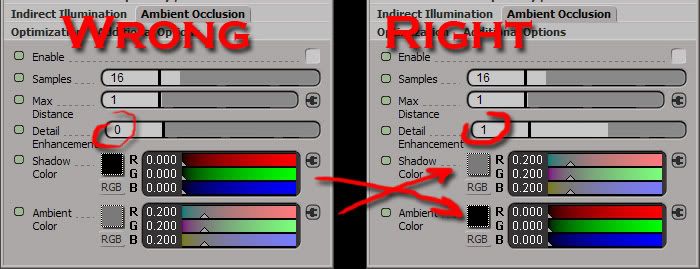
The bug is in the default values for the Ambient Occlusion settings.

You will find that the defaults for two values are flopped: AO Shadow Color is black, and "AO Ambient" is set to a 20% gray (0.2 0.2 0.2). The proper defaults are the reverse!! Also, the AO detail enhancement is off (0).

If you use the defaults as-shipped in Softimage 2010, you get an undesired 20% ambient contribution, and your AO will only apply to that light - not your indirect bounce light.


Fixing the default will give you the proper result, and not give you a sudden 20% light coming from nowhere in particular which you probably never wanted, AND will let you use the AO to enhance the detail of your indirect illumination, as the Lord* intended.

Hope this helps!

/Z

* = That would be me in this case ;)

2006-11-17

DOF and Sun & Sky issue

There is a known issue when using the Sun & Sky in max 9 together with depth of field. Objects turn out like odd wireframe-looking... things.

The cause for this is actually the long list of lens shaders that gets added by the "Aerial Pespective" feature built into Sun & Sky.

For now there is a workaround.

Proceed as follows:

  1. Create a Sun & Sky system as normal, by creating a daylight system and choosing "mr Sun" and "mr Sky", affirming the pop up question of "do you want to ad a 'mr Physical Sky' environment" with a resounding YES.
  2. Then, change the skylight option from "mr Sky" to "Skylight"
  3. Change the Skylights option to "Use Scene Environment"
Now a nearly identical rendering (but without any Aerial Perspective) will result, since the standard mad Skylight will pick up the "mr Physical Sky" environment shader for the lighting. The net result is nearly identical to the normal rendering using a "mr Sky" and the depth of field will now work.

The difference is that now one needs to do any "tweaks" to the sky strictly in the "mr Physical Sky" shader, and to do this, one needs to "drag-and-drop" it (as an "instance") from the "Environment" dialog into a free slot of the material editor, then tweak away.

/Z

2006-11-08

mental ray sun&sky and rapid motion blur

There is an issue in the initially released version of max 9 (the one with mental ray 3.5.2.6) which makes the sun&sky system not behave with rapid scanline motion blur.

The workaround is to turn of the "Aerial perspective". Go to the "mr Sky" light and uncheck the "Aerial Perspective", and you will find the rapid scanline motion blur working fine.

/Z